Customer Feedback Management: From Inbox to Product Decisions

A customer asks for a feature in chat. A second customer describes the same problem on a call, but suggests a different fix. Three people vote for a request on a feedback board. If those signals stay in separate places, the product team has to reconstruct the problem before it can decide what to build.
Customer feedback management software helps teams collect customer input, preserve its context, compare related requests, make product decisions, and follow up on the outcome. A customer feedback management tool becomes more useful than a standalone inbox when it can carry that evidence into roadmap planning, release communication, and adoption tracking.
The distinction matters because collecting a request is only the first step. The harder questions come later: Who has the problem? How much does it affect their work? What did the team decide? Did the shipped change solve it?
What a feedback inbox can and cannot do
A support inbox is good at helping one customer get an answer. A feedback board can make requests visible and let people vote. Either may be enough if a small team already has a reliable way to connect customer input to product work.
Trouble starts when the request loses its history at each handoff. A product manager copies a summary into a planning document. An engineer sees the proposed feature but not the underlying problem. A changelog announces the release, while the customers who raised the issue never hear about it. The team marks the request complete without checking whether people use the new workflow.
Customer feedback management is the practice of keeping that history useful. It does not mean promising to build every request or treating the most votes as the highest priority. It means retaining enough evidence to explain a decision and revisit it when new information arrives.
Standalone inbox vs. connected feedback management
| Job | Standalone inbox or feedback board | Connected feedback management workflow |
|---|---|---|
| Collection | Stores messages or requests, often with a way to reply or vote | Brings related input into a shared view while retaining customer and account context |
| Prioritization | Shows request volume; the team may compare impact elsewhere | Helps the team group problems and review who is affected, why, and how often |
| Roadmap linkage | Requires someone to transfer the request into planning | Keeps customer evidence associated with the roadmap decision |
| Release follow-up | May require a separate list of people to notify | Connects the shipped change to communication and follow-up |
| Adoption tracking | Usually ends at "shipped" or "answered" | Gives the team a way to check whether the intended product behavior happened |
This is a workflow comparison, not a rule that every inbox lacks integrations or every connected platform handles each step equally well. When comparing tools, test the handoffs with one real request rather than relying on a feature list. Managani's guide to choosing customer feedback tools breaks down when a board, survey, support inbox, research repository, or analytics tool is the right starting point.
Follow one request through the whole process
Suppose several customers ask for "better reports." One wants to save filters for a weekly review. Another wants to share a report with a teammate. A third cannot find a report they created yesterday. Recording all three under a single feature request would inflate apparent demand while hiding three different problems.
A useful customer feedback management process would handle them this way:
- Capture the customer's words and context. Record the job they were trying to finish, what blocked them, and which account or user raised it. Keep the suggested solution, but do not mistake it for the problem.
- Group related problems without erasing differences. The two requests about returning to a report may belong together. Sharing a report might require a separate decision. Ask whether customers are struggling at the same point in the workflow before merging requests.
- Compare evidence, not just totals. Look at affected customers, frequency, severity, current workarounds, and relevance to the product's direction. Five votes for a minor convenience should not automatically outrank one well-documented blocker.
- Record the decision. If the team chooses saved report views, link that work to the supporting feedback. If it defers sharing, note why and what evidence would change the decision. A roadmap should communicate direction without turning every request into a delivery promise; these product roadmap examples show ways to express that distinction.
- Follow through after shipping. Tell the relevant customers what changed, show users where to find it if necessary, and check whether they save and reuse report views. A release announcement alone does not prove the problem was solved.
That last step separates request closure from product learning. If customers still cannot complete their weekly review, the team needs to know whether they missed the release, could not find the feature, or found that it did not meet their need.
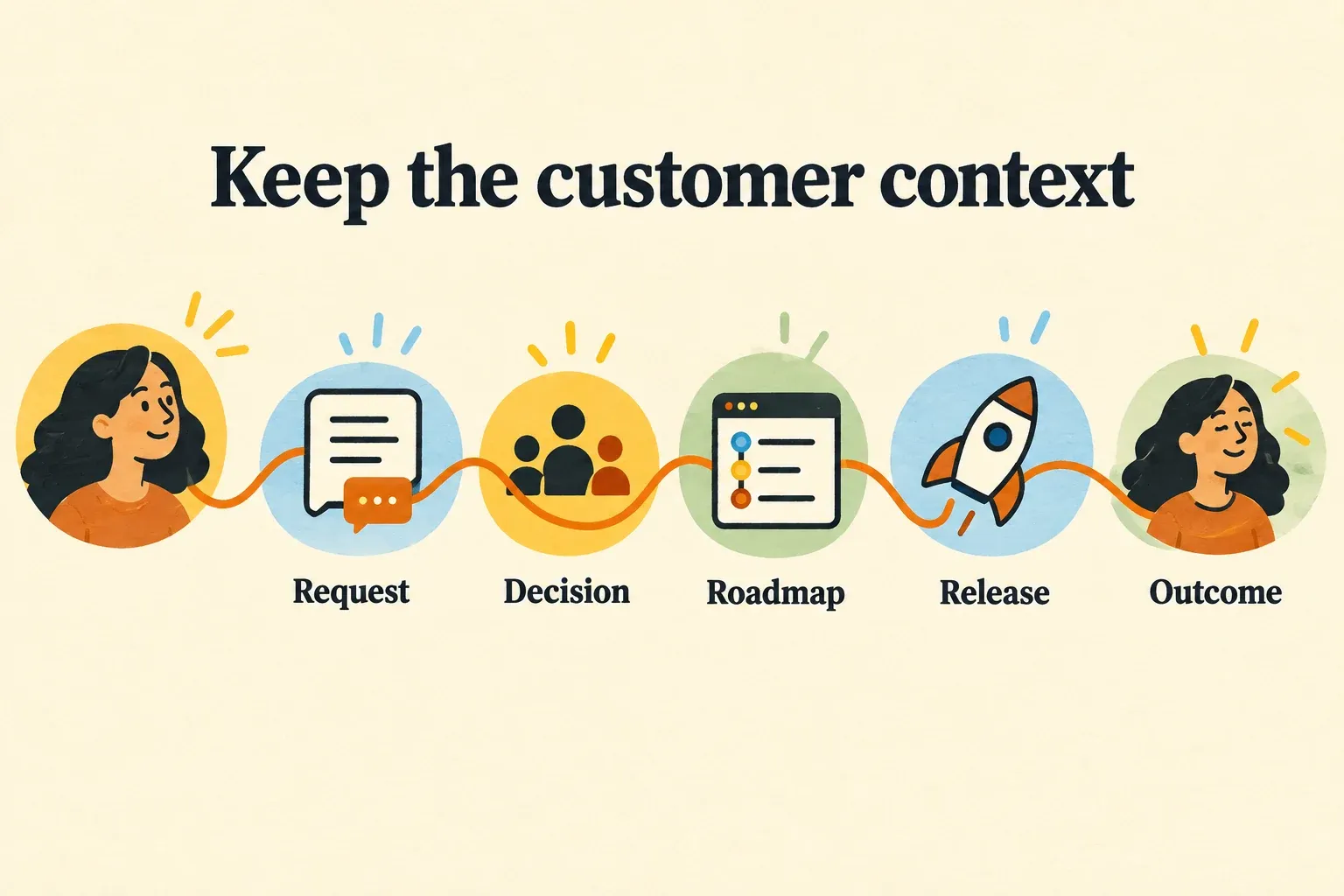
How Managani connects feedback to the next step
Managani is built around a connected product workflow for lean SaaS teams. Its feedback workflow is designed to keep requests and account context together, organize them for product decisions, and link them to roadmap work. Changelog updates, in-app guidance, and product-usage tracking then help the team follow a shipped change beyond its release date.
For the report example, the goal is not to produce a bigger request list. It is to preserve the path from "customers cannot return to a useful report view" to a planning decision, a shipped improvement, communication to affected users, and evidence of whether those users adopted the new behavior. Managani's tracking concerns product usage and adoption, not general website traffic. The product analytics and adoption guide explains why teams should measure meaningful actions rather than assume that seeing an announcement equals using a feature.
Managani is currently offered as a managed beta. Its complete application repository and documented self-hosting are planned for after beta, rather than available as a self-hosted product today.
How to choose a customer feedback management tool
Run a short evaluation using a request your team has already handled. Choose one that arrived through a real customer conversation and resulted in a decision, whether or not you built anything. Then ask each tool to show the same trail:
- Can you retain the original context? The product team should be able to find the customer problem, not only a rewritten feature title.
- Can you separate similar requests? Grouping should reveal common needs without combining unrelated jobs because customers used the same word.
- Can you explain priority? Look for a way to weigh impact and relevance alongside votes or request counts.
- Can you see the decision from the roadmap item? A teammate should be able to understand why work was planned, deferred, or declined.
- Can you identify who needs follow-up? Check what happens when the change ships and how the team reaches customers who raised the issue.
- Can you assess the outcome? Decide what user action would demonstrate adoption, then check whether the workflow helps you review it.
A standalone inbox is a sensible choice when answering and routing individual conversations is the main job, and your team already maintains the later handoffs. Choose a connected workflow when people regularly copy the same context between feedback, planning, releases, and tracking. The purchase decision should depend on where your team loses information, not on which vendor offers the longest feature checklist.
Frequently asked questions
What is customer feedback management software?
Customer feedback management software helps a team collect customer input, organize related problems, evaluate evidence, record decisions, and respond to customers. Some tools focus on one part of that process, such as a feedback board. Others connect requests to roadmap work, release communication, and adoption tracking so the team can assess what happened after shipping.
What makes a customer feedback management tool better than a standalone inbox?
It is better for product decisions when it preserves customer context across the steps an inbox does not usually own: prioritization, roadmap linkage, release follow-up, and adoption measurement. An inbox remains valuable for resolving conversations. A connected tool is useful when the team needs to understand whether customer input led to a change that people adopted.
If those handoffs are the gap in your current setup, you can request access to Managani's feedback and roadmap beta and test the workflow with a request your team already knows well.