Customer Feedback Management Software: From Input to Impact

A customer asks for a way to export reports. Another asks for a scheduled email. A third says their team cannot share results without copying data into a spreadsheet. If those messages sit in separate inboxes, the product team may see three requests instead of one underlying problem.
Customer feedback management software helps a team preserve that context, find related requests, decide what to do, and follow up after a change ships. The useful question is not how many ideas the software can collect. It is whether someone can trace a customer problem from the first report through the roadmap decision to the result.
How customer feedback management software works
The workflow has seven parts: collect feedback, de-duplicate related requests, add customer and theme context, prioritize the problem, connect the decision to a roadmap item, communicate the release, and check whether customers adopt the change. Each part should leave enough information for the next person to act without reconstructing the story.
1. Collect the request where it happens
Feedback can arrive through an in-app widget, support conversation, survey, sales call, or customer meeting. Record the customer's words before translating them into a proposed feature. "I need a weekly export" is a request; "my manager cannot see the results unless I rebuild the report every Friday" explains the job behind it.
Keep the customer or account, the part of the product involved, and any relevant conversation together. Managani's feedback widget lets signed-in customers submit requests, add supported attachments, vote, comment, subscribe, and review requests connected to their identity. A report from another channel still needs someone to capture its context rather than dropping a one-line idea into a board.
Not every message belongs on a feature roadmap. A broken export may need a support or bug response now. A request for a weekly email may call for product discovery. Separating those paths early prevents a customer who needs help today from waiting on a future release.
2. De-duplicate without erasing differences
Group requests that describe the same problem, but retain the individual accounts and their reasons. The export, scheduled email, and spreadsheet workaround may all point to a reporting-sharing problem. They should be reviewed together, not counted as three unrelated ideas.
Grouping does not mean assuming every proposed solution is interchangeable. One customer may need an auditable file for a compliance process; another may need colleagues to see live results. Keep both statements attached to the theme. Otherwise, a popular-sounding request can hide a requirement the eventual solution does not meet.
A simple review rule helps: before creating a new theme or roadmap item, search for an existing problem statement. Add the new customer's evidence there if it fits. If it does not, record why it differs.
3. Add account and theme context
Tags are useful when they help answer a decision question. For a reporting request, that might mean identifying the affected account, customer role, workflow, and theme. An account tag shows who is asking; a theme such as "sharing results" helps the team find related feedback across different feature suggestions.
Avoid building a taxonomy that takes longer to maintain than the feedback takes to review. Start with a few consistent themes and use the customer's own description alongside them. "Reporting" alone tells a product manager little. "Account admins cannot share current results with managers outside the product" gives them something to investigate.
Account context also keeps voting in perspective. Ten votes from one organization are evidence of interest, but they are not the same as ten organizations encountering the problem independently.
4. Prioritize the problem, not the request count
A review should compare what customers are trying to accomplish, how often the problem occurs, whom it affects, and what happens if it stays unresolved. Then weigh that evidence against the team's product direction and the cost of possible solutions.
For the reporting example, ask:
- Are customers blocked from completing a recurring task, or asking for a convenience?
- Do several accounts describe the same obstacle independently?
- Is there a workaround, and what does it cost them?
- Would an export solve the problem, or is sharing live access the better answer?
- Which customers should the team speak to before committing?
The outcome need not be "build." It might be "investigate," "address through existing functionality," "defer," or "decline." Record the reason. That makes the next review faster and gives customer-facing teammates an answer they can explain without implying a release date. For a closer look at evaluating individual requests, see the feature request management guide.
5. Connect the evidence to a roadmap decision
Once the team chooses a direction, link the problem and its supporting accounts to the relevant roadmap work. A roadmap entry should describe the outcome the team is pursuing, not merely repeat the most common feature suggestion.
For example, "Help account admins share current reporting results" leaves room to test a link, permissions change, export, or scheduled delivery. "Build scheduled PDF emails" commits to a solution before the team has established that it solves the broader problem.
The connection matters later. If scope changes, the team can revisit the original evidence. If the work is deferred, the reason remains visible. And when the release is ready, the team knows which customers asked about it. The product roadmap examples show ways to communicate direction and confidence without treating every idea as a promise.
6. Publish the update and reach the right customers
Shipping the change is not the same as telling customers it exists. Publish a release update that names the problem addressed, explains who can use the change, and gives a clear next step. Then follow up with the people whose feedback informed the work.
Be precise about scope. If the team shipped shareable reporting links but not scheduled emails, say so. A customer who asked for an automated weekly report may still need a different solution. Marking their request "done" without checking the fit closes an internal task, not the customer loop.
Managani connects feedback with roadmap planning and changelog communication, so the original request can inform both the decision and the release update. Where discovery inside the product is the obstacle, an in-app announcement can point eligible users toward the new workflow.
7. Verify adoption, then listen again
After launch, check whether the intended customers can complete the task. For a new reporting-sharing flow, a useful signal might be an eligible account creating a share link and a colleague opening the result. An announcement view alone would show exposure, not adoption.
Define the behavior before reviewing the numbers. Compare it among accounts that have access and a reason to use the feature, over a time window that matches their reporting cycle. Then return to the feedback: did the customers who raised the problem succeed, or are they still exporting and rebuilding reports manually?
Managani's product tracking is intended to connect shipped work to usage and adoption rather than broad website traffic. The guide to tracking events for feature adoption explains how to choose events that indicate a user reached value. If use is low, the next step may be clearer guidance, a product adjustment, or another customer conversation, not a new feature.
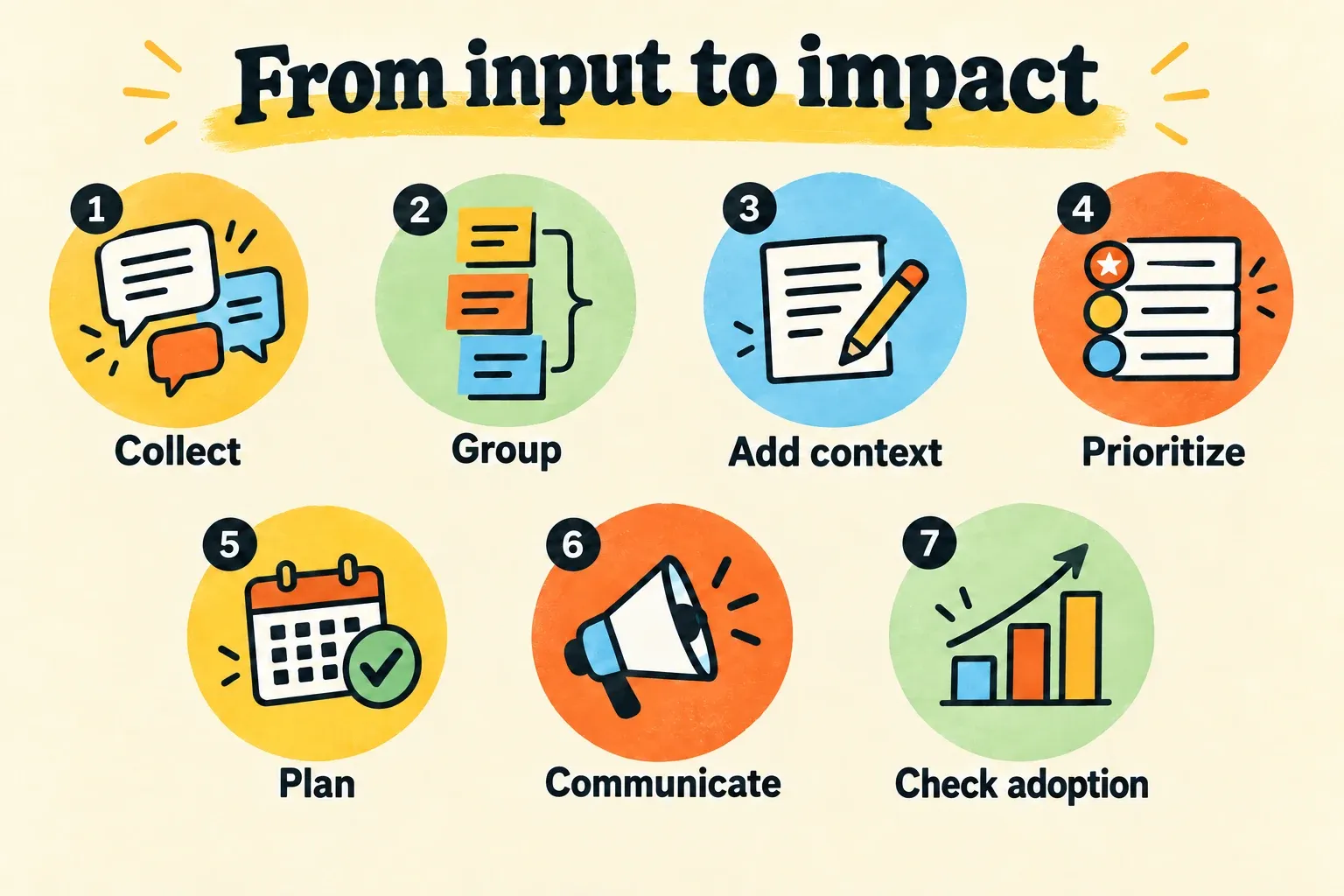
Keep the workflow small enough to run
Software does not make every request a priority. It makes the evidence and follow-up easier to manage. A lean team can start with one owner for incoming feedback, a regular review of related requests, a recorded decision for each active theme, and a check after every relevant release.
Use the smallest process that answers four questions: What problem did customers report? Why did we make this decision? Who needs an update? Did the shipped change help? If a tool stores submissions but leaves those answers scattered across an inbox, roadmap board, changelog, and analytics account, the team is still doing the management work by hand.
Frequently asked questions
What is customer feedback management software?
Customer feedback management software is a system for collecting customer input, organizing related requests, preserving account context, and using that evidence to make product decisions. It should also help a team connect decisions to releases and follow up with customers afterward. The goal is not to turn every request into a feature; it is to make customer problems visible and traceable.
How is it different from a feedback inbox?
A feedback inbox gives messages a place to land. Customer feedback management software supports the work that follows: grouping duplicates, finding themes, comparing customer evidence, recording priorities, connecting requests to roadmap decisions, and checking results after shipping. An inbox can be enough when the volume is small and the team already handles those steps consistently elsewhere.