SaaS Onboarding Software: From First Setup to Lasting Use

A user can finish a product tour and still have no idea how to get value from the product. They have seen the menus, but they have not completed the task they signed up to do. SaaS onboarding software should close that gap: guide the right person through a useful action, then help the team see whether that action led to continued use.
This applies to new accounts and to existing customers encountering a newly shipped feature. In both cases, the goal is not to make users click through more guidance. It is to help them accomplish something that matters to them.
What SaaS onboarding software should do
SaaS onboarding tools typically offer tours, highlights, checklists, tooltips, and in-app messages. Each has a different job. The choice should follow the user's task, not a desire to use every available format.
| Onboarding element | Useful when | Watch out for |
|---|---|---|
| Tour | A user needs to understand a short sequence across unfamiliar screens | Walking through the whole interface before the user has a reason to care |
| Highlight or tooltip | One control needs explanation at the moment it becomes relevant | Covering obvious controls with interruptions |
| Checklist | The user has a few meaningful setup tasks to complete over more than one session | Counting cosmetic steps as progress |
| In-app message | A specific audience needs to know about a next step or relevant release | Showing the same announcement to everyone |
| Survey or feedback prompt | The team needs to learn why users stopped or what remains unclear | Asking for an opinion before the user has tried the workflow |
A tour can show where a button lives. A checklist can keep an unfinished task visible. Neither proves the user got a result. That distinction matters when comparing onboarding SaaS software: ask what the tool helps users do, and what it lets your team learn afterward. For a closer look at individual formats, see the SaaS onboarding feature breakdown.
Begin with an activation action
Activation is the first meaningful outcome a user can reach, not the last screen of a walkthrough. For a product-growth workspace, that might be capturing a real customer request and organizing it so the team can act on it. Creating an empty workspace or viewing a dashboard may be necessary, but those actions alone do not show that the user has experienced the product's value.
Write the desired action as a sentence before building the flow: "A new product lead can record a customer request and give it enough context for a roadmap decision." That sentence helps the team decide which steps need guidance and which can stay out of the way.
Then identify what the user must do first. If they need to invite a teammate, connect a source, or add a first item, make that step easy to find. Do not require someone to complete an unrelated tour before they can work.
Match guidance to the moment
A first-time administrator may need setup help. An invited teammate may only need to understand the part of the workflow they own. An existing customer who asked for a feature needs help finding and using that feature, not a repeat of new-account onboarding.
Use the lightest format that solves the problem. A short highlight may be enough to point an existing user to a new control. A checklist makes more sense when setup spans several sessions. Save a tour for a genuinely unfamiliar sequence, and let users dismiss guidance when they already know what to do.
Timing deserves the same care. A message shown at login may be forgotten before the user reaches the relevant screen. Guidance placed where the task happens gives the user a chance to act on it immediately.
Build a flow around one real task
Consider a SaaS team introducing customers to Managani's feedback workflow. A focused onboarding flow could look like this:
- Set the goal: Help a product lead capture one real request with enough context to discuss it.
- Remove the first obstacle: Point the user to feedback capture rather than presenting a tour of feedback, roadmap, changelog, and analytics all at once.
- Show only the next useful step: Explain how to categorize the request when the user reaches that task.
- Define completion: Record whether a usable request was created, not whether the guidance was viewed.
- Offer a next action: Once the request exists, show how it can inform roadmap work. Keep that separate from the initial activation goal.
This is an example of how to design a flow, not a claim that one prescribed sequence fits every Managani account. Teams should test it against the tasks their users actually arrive to complete.
Managani's product workflow connects feedback with roadmap planning, release communication, guidance, and usage tracking. That makes it possible to think beyond the first checklist. A request that shapes a release can later inform which users need an announcement or in-app explanation. The customer feedback workflow explains why keeping that context matters.
Before publishing a flow, try it with someone who has not seen the design. Give them the goal, then watch where they pause. If they can complete the task without a prompt, remove the prompt. If they follow every instruction but still cannot explain what they accomplished, the flow needs a better outcome, not more steps.
How onboarding connects to adoption
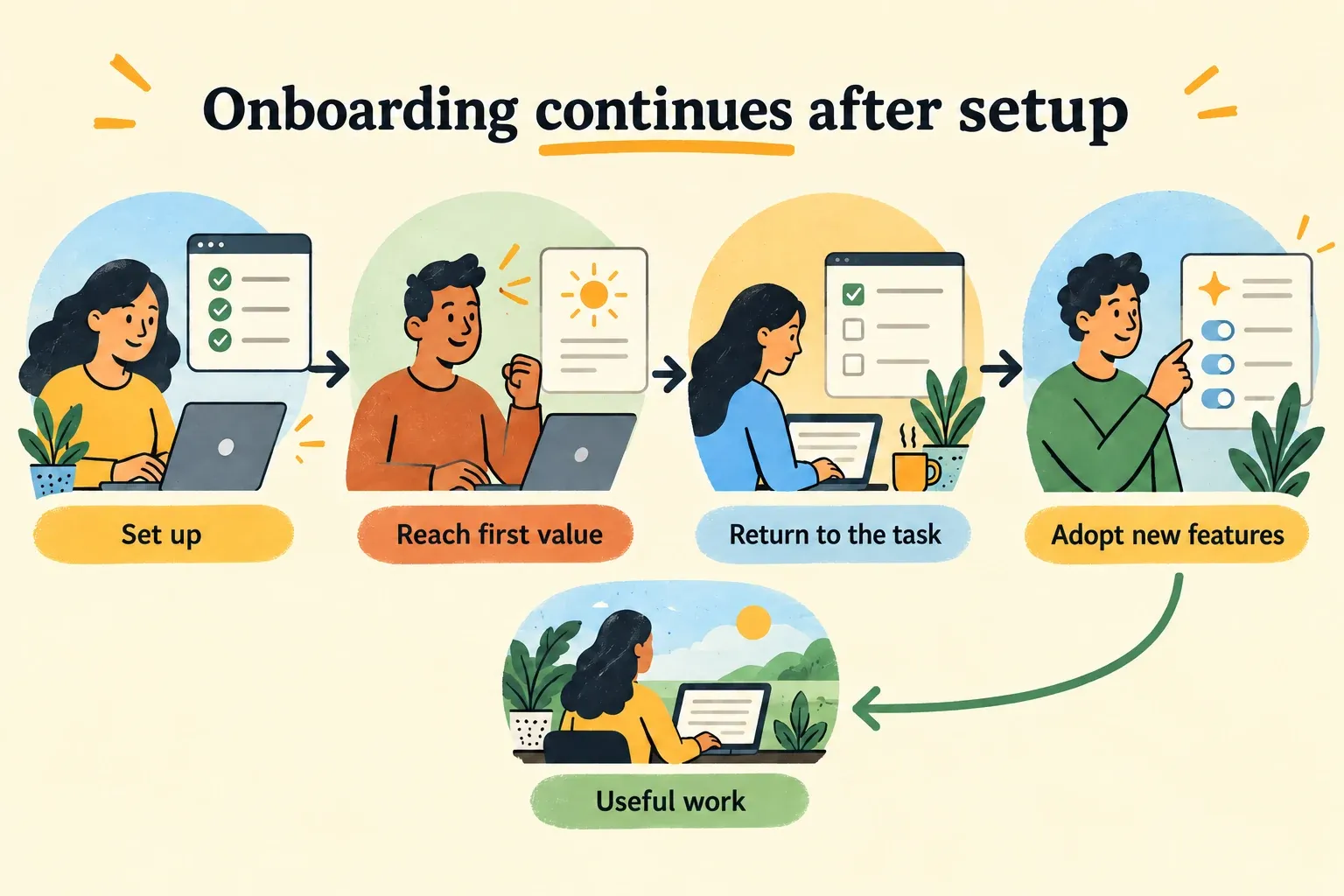
Activation and adoption answer different questions. Activation asks whether a user reached an initial useful outcome. Adoption asks whether eligible users return to the behavior when they need it. Someone might submit one request during onboarding and never use the feedback workflow again.
Choose a measure for each question before launch:
- Activation: Among new users who could perform the task, how many completed the first meaningful action?
- Drop-off: At which task did eligible users stop?
- Adoption: Among users with access to the workflow, how many used it again within a period that matches their normal work?
- Feedback: What did users say when they could not complete the task or did not return?
Avoid treating tour completion, message views, or checklist clicks as substitutes for product use. They tell you whether guidance was encountered. A task-completion event tells you more about whether it helped. If the workflow is used only during a monthly planning cycle, judge repeat use over a suitable cycle rather than expecting daily activity.
After a feature launch, compare the people who were meant to use it with the behavior you hoped to change. If users saw an in-app message but did not try the feature, the issue could be the message, its timing, the feature's relevance, or friction in the product. Usage data identifies the pattern; customer feedback helps explain it. The guide to product analytics and adoption covers how to interpret that distinction without mistaking exposure for success.
Give someone ownership of the review. That person should check the chosen actions after launch, read the related feedback, and decide whether to change the guidance, the workflow, or the measurement. Otherwise, onboarding can become a permanent layer of prompts that nobody revisits.
Choose tools for the job after the first tour
A dedicated onboarding tool may be enough if your main need is in-app guidance and your team already has a reliable way to connect releases, feedback, and usage data. Check that it can place guidance in the right context and that maintaining flows will not require constant developer intervention.
If every launch requires someone to copy a release update into a messaging tool, recreate customer context in an onboarding tool, and then search a separate analytics tool for evidence of use, the handoffs become part of the buying decision. Managani is designed to keep those product-growth activities connected for lean SaaS teams. Its managed beta offers that workflow now; the full application is planned to become open source after beta.
For a broader comparison of account-level onboarding and in-app guidance, use the B2B SaaS onboarding selection guide. For any shortlist, run the same practical test: pick one real user task, build the smallest helpful flow, and check whether you can tell if the user completed the task and came back to it later.
Good SaaS onboarding software makes that test possible. It helps a person reach value without making guidance the main event, and it gives the team enough evidence to improve the experience after the flow goes live.