SaaS Onboarding Software: Build a Clear Path to First Value

A new user signs up, reaches an empty workspace, and stops. A tour could explain every button on the screen, but it would not answer the question that matters: "What should I do first to get something useful out of this product?"
SaaS onboarding is the process of helping a new user reach that first useful outcome. SaaS onboarding software supports the process with checklists, tours, highlights, and contextual prompts inside the product. The goal is not to make users finish a tour. It is to help them complete a task they came to do.
For a lean SaaS team, that distinction makes onboarding easier to design and evaluate. Start with one meaningful outcome, guide users through the steps that lead to it, then check whether they reached it.
Start with the action that proves value
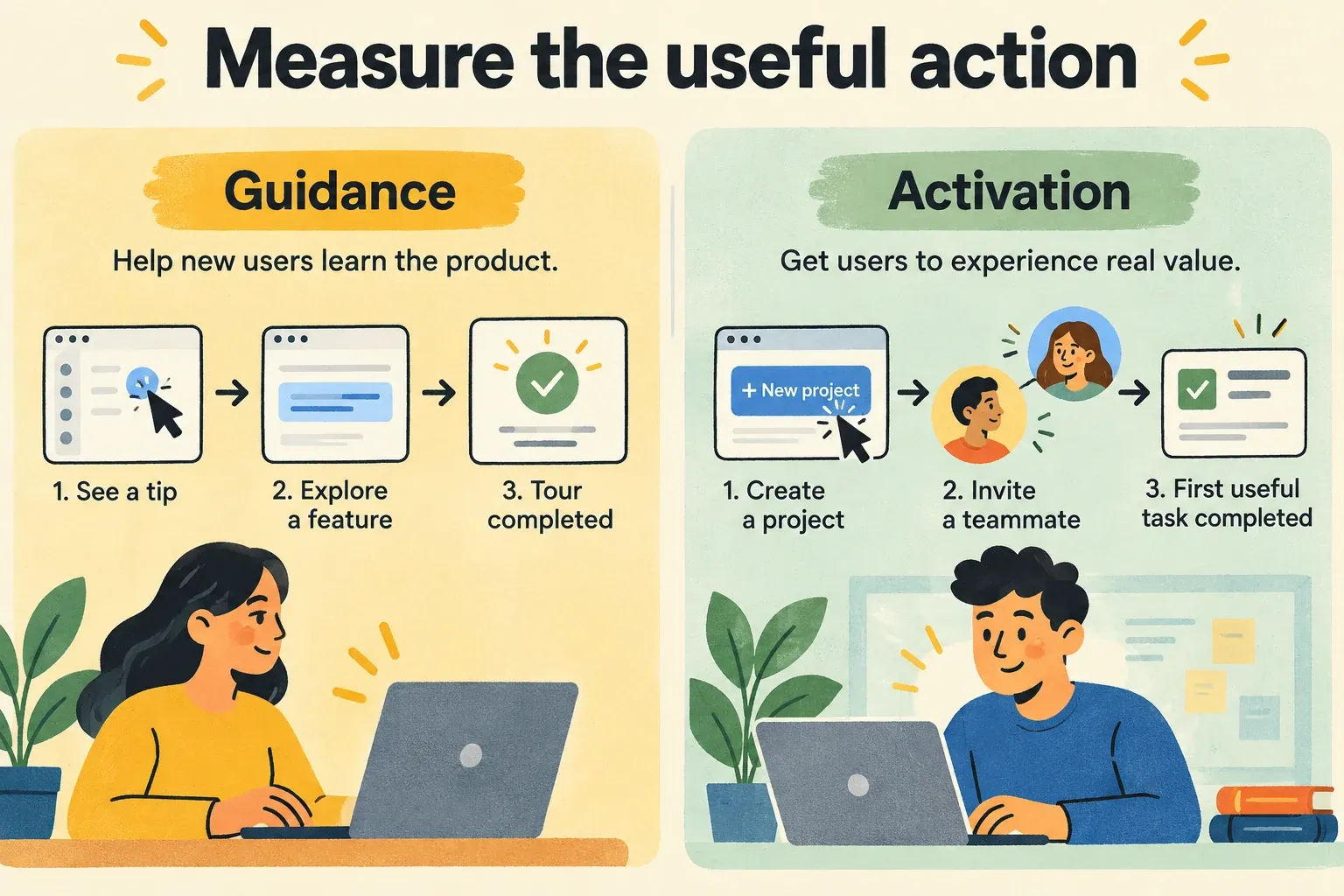
Before choosing a checklist or writing a tooltip, name the action a new user should complete. "Explore the dashboard" is too vague. "Create a project and invite a teammate" is observable, though it is only a good activation milestone if collaboration is where users begin to get value.
The right milestone depends on your product and the user's role. An account administrator may need to finish setup before anyone else can work. An invited teammate may get value from completing a task in a project that already exists. Giving both people the same onboarding flow can send one of them through steps they cannot or do not need to take.
Write a short definition before building guidance:
A new [type of user] reaches first value when they [complete a meaningful action], within [a reasonable time window] after gaining access.
This definition is a working hypothesis, not a permanent rule. If customers say the action did not help them do their job, or if they complete it and never return, revisit the milestone.
Use guidance where users need a decision
The common elements of SaaS onboarding software do different jobs. Choose each one for a point of friction rather than adding them all to every screen.
- Checklists show the few steps that lead to a useful outcome. Each item should describe an action the user can finish, not a page they should visit.
- Tours help when a workflow requires several connected actions that are difficult to discover independently. Keep the tour close to the task; avoid walking through unrelated navigation.
- Highlights and tooltips draw attention to a specific control when the user needs it. They are useful for a single choice, not for explaining an entire feature.
- Contextual prompts offer a next step based on where the user is in the product. A prompt on an empty project, for example, can be more helpful than an announcement shown immediately after signup.
Suppose a new account needs to collect its first piece of customer feedback. The onboarding path might point an administrator to setup, show where to place the feedback widget, and then explain how to review a submitted request. A full tour of roadmap planning and release updates can wait. Those tools become easier to understand once the team has feedback to act on.
There should also be a way to continue without guidance. A user who already knows the product should not have to dismiss the same tour on every visit, and someone who pauses midway should be able to find their next step later.
Keep activation separate from tour completion
Activation means a user has completed an action that indicates they have begun to get value. Tour completion means they saw or clicked through guidance. The two can move together, but they are not the same measure.
A useful onboarding review looks at three points:
- Entry: Which eligible users reached the place where onboarding could help?
- Progress: Which setup or workflow steps did they complete, and where did they stop?
- Outcome: Which users completed the action defined as first value?
For example, if most users finish a setup checklist but few complete the first real workflow, shortening the checklist may not solve the problem. The missing step could be unclear, require data users do not yet have, or lead to an outcome that does not feel useful. If users reach value without touching a tour, the product may already explain that part of the journey well.
Track actions that reflect product use, not just prompt views and clicks. Managani's approach to tracking events that show feature adoption is relevant here: decide what behavior would demonstrate progress, then compare that behavior with the guidance users received. Ask customers where they got stuck when the event data does not explain why.
Revisit onboarding when the product changes
Onboarding is not finished when the first flow goes live. A changed screen can make an old highlight point to the wrong place. A new setup requirement can turn a once-useful checklist into a dead end. Review guidance alongside the product changes it describes.
New releases also create a second onboarding need: existing users may need help adopting a feature they have not seen before. A changelog can tell them what shipped, while an in-app prompt can help them try it in the relevant workflow. Usage tracking then shows whether the message led to the intended action. This connection between changelog updates, guidance, and adoption is more useful than treating a release announcement as the end of the job.
Managani brings onboarding guidance into the same product-growth workflow as feedback, roadmap planning, changelogs, and tracking. That gives a small team a practical review cycle: learn what users need, guide them to the next action, measure what they do, and adjust the product or the guidance when they do not reach value.
Start with one path. Pick the user, define the first useful action, add only the guidance needed to reach it, and measure the action itself. Once that path works, build the next one from evidence rather than adding another tour because there is a screen left unexplained.